IntensityCalibration
Polynomial angle intensity
Sometimes, intensity calibration will not work out the box. I never really understood why, but know a way to fix it...
If you can not reproduce variation of the peak intensities with 2 theta in your calibration, you should first check that the crystallographic properties you enterred are correct. If they are, and if you can still not get the right intensity ratios between peaks, you can use the Polynomial Angular Intensity for your instrument properties. It will calibrate the diffraction intensities as a function of 2 theta.
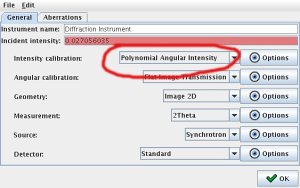 | 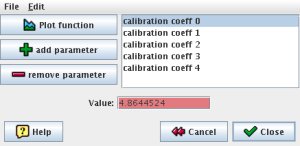 |
Figure 1: choosing Polynomial Angular Intensity for angular calibration | Figure 2: setting parameters for the Polynomial Angular Intensity |
In order to activate this mode, open up your instrument parameters tab, and select Polynomial Angular Intensity for the intensity calibration (Figure 1). Open up the option dialog and add 5 or 6 polynomial parameters (Figure 2).
Those parameters will calibrate the intensity of the diffraction as you move away from the beam center.
Refining parameters for the "Polynomial angle intensity" model
In order to refine those parameters, I typically run a refinement with
- the incident intensity
- the polynomial angle intensity parameters
- the backgrounds
and it converges very quickly.
Good luck!