FirstStepManualAdjustment
Incident intensity and first background parameter
At this point, a few parameters can be adjusted by hand: incident beam intensity and background...
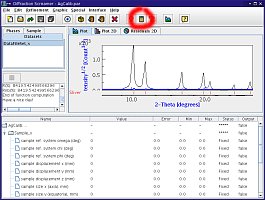 | 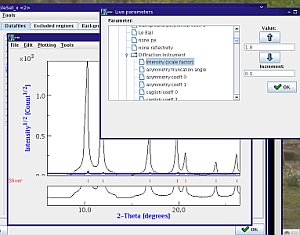 |
| Maud with a calculated spectrum | Manual adjustment of parameter |
First, you should calculate a spectrum: in the main Maud window, click the the Calculator icon, and the Maud window should look like this:
- in black: the calculate pattern,
- in blue: the experimental data,
both for the first azimuth. Unless you're really lucky, it's probably very far off...
Now, Maud has a very good function that allows you to manually adjust paramaters and see the effects immediately:
- in the main window, select the
Datasetpanel, and edit your dataset (click on theeyeicon) - in the dataset window, select the
Datafilespanel, and select one of the spectra (any), - click on
View, - in the View window, select the
Toolsmenu andChange Parameteroption,
and you should end up with something like the screen shot that allows you to manually adjust parameters.
In the panel, adjust both
Intensity (scale factor)Background Polynomial Coef 0of theDataset
in order to get something reasonable.
You will notice that your peaks do not exactly match the experimental data in terms of
- peak positions,
- peak profiles,
- ratios of intensities,
- high order background parameters...
We will now adjust all of this with a real refinement...
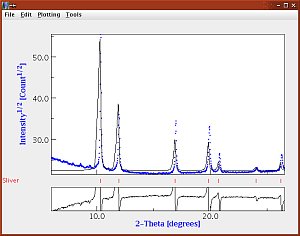
Maud plot window after a first manual refinement
Note: you can also run through this procedure by adjusting parameters in the bottom panel of MAUD and see the global spectrum being adjusted. This can be a bit tricky if your sample is stressed, for instance.